
Most CRMs aren’t built to sell subscriptions. They're designed around the old-school sales model where "closed-won" means you're done. But as a B2B SaaS founder, you know that closing the deal is just the beginning. Your business lives on renewals, expansions, and upsells. A customer who churns after three months can lose you more value than a prospect who never signed.
This mismatch between traditional CRMs and SaaS business models is costing founders real money (and sleep). When your CRM can't track MRR movements, surface at-risk accounts, or connect product usage to revenue outcomes, you're essentially running your subscription business with a tool designed for selling cars.
Here's how to choose a CRM that actually gets the SaaS model—and helps you scale without losing your mind.
The must-have CRM features for founder-led sales in SaaS
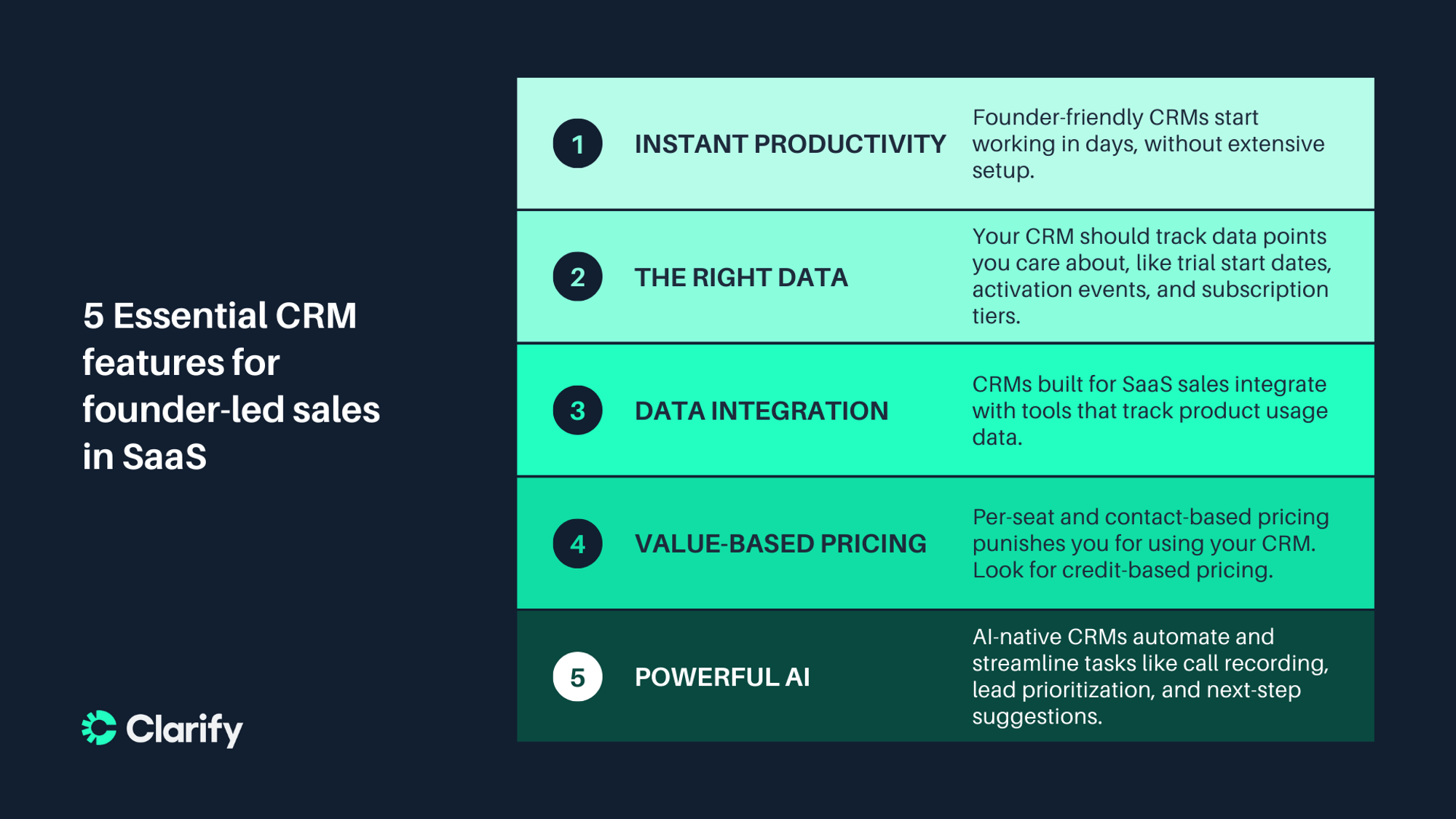
Forget the 47-page feature comparison spreadsheets. When you're a founder wearing multiple hats, you need CRMs that nail these fundamentals.
Instant productivity
You don’t have any time to waste with complex, overly-featured CRMs that take weeks or months to configure. Founder-friendly CRMs allow you to capture value in days, with default settings that match your needs. Set up your users, import data from tools you’re already using, and you’re operational. If you need to read documentation longer than this guide to get started, keep looking.
Subscription-aware data models
When you run a SaaS business, you need a CRM that can help you track trial start dates, activation events, subscription tiers, and renewal dates. If it can automatically flag free trials as they end, calculate MRR from actual billing data, and surface accounts approaching renewal, then you’ve found a CRM that might work for you. These settings should ideally be automatic. Too much manual configuration wastes time you could spend selling.
Usage data integration
A CRM that integrates natively with the tools that track usage data for SaaS products can help you identify expansion opportunities and churn risks in time to do something about them. Whether it’s a customer who suddenly stops logging in or who consistently hits their plan limits, your CRM should guide you towards the proper action. If you wait for bi-weekly or quarterly reviews to identify these patterns, it might be too late.
Pricing that scales with value
Traditional per-seat or contact-based pricing punishes you for adding team members, incentivizing you to use your CRM less. Clarify’s credit-based pricing is an example of a pricing model that actually scales with the value you get out of your CRM rather than arbitrarily limiting the size of your team or the number of contacts you can track.
Powerful AI features
Many CRMs use legacy infrastructure with AI features bolted on. They might help you draft outreach emails or pull data from different parts of your tool stack. But they’re not AI-native, meaning you’re often choosing between different sets of limited features. AI-native CRMs use AI across all your tasks, from automatic call recording and synthesis to intelligent lead prioritization, churn prediction, and next-step suggestions that keep deals moving. These aren’t nice-to-haves. They’re essential for staying competitive as you grow.
Comparison table: CRMs for B2B SaaS founders
While legacy platforms like Salesforce and HubSpot still dominate the playing field for enterprise sales teams, a new generation of founder-friendly platforms targets the needs of B2B SaaS founders. Here’s how a few of them actually compare (with HubSpot as an example of a more traditional CRM).
| Clarify | Attio | Folk | HubSpot | |
|---|---|---|---|---|
| Free plan? | Yes ✅ | Yes ✅ | No ❌ | Yes ✅ |
| Free plan limitation | 2,500 AI credits | 3 users | N/A | Limited automation |
| Starting price for paid plans | $20/month | $36/user/month | $25/user/month | $15/user/month |
| Pricing model | Unlimited seats, pay for AI work | Per-seat + workflow credits | Per-seat | Per-seat |
| Setup time | Hours | Days | 1 day | Weeks |
| AI Automation | AI-native | AI enrichment and insights | AI contact research | Add-on (Breeze) |
| Integrations | Zapier integrations and API | 70+ native | 20+ native | 100+ native |
| Call recording | Automatic transcription | Available on Pro and Enterprise plans | Third-party only | Third-party or integration required |
| Best for | B2B founders who want an autonomous CRM | Teams that need more customization | Relationship management | Enterprise sales |
What this comparison can tell you
Clarify stands out for founders who want to eliminate the administrative work involved in non-selling tasks entirely. As an autonomous CRM, it makes automatic call capture, AI-powered contact enrichment, and intelligent task creation happen without extensive manual configuration. The credit-based pricing model also supports your team as it grows.
Attio is appealing to founders who need maximum flexibility. Its Notion-like interface lets you build a CRM that fits your needs exactly, but this requires a more thorough setup than other options. The hybrid pricing model (per-seat and workflow credits) can get expensive as you scale.
Folk works well for founders prioritizing relationship intelligence over AI features. It’s a great option for contact management and team collaboration, but it lacks other AI features that reduce manual work. This CRM is best for sales teams where relationships matter more than velocity.
Traditional platforms like HubSpot provide comprehensive features but require significant configuration and higher costs to unlock SaaS-specific capabilities. Great if you're planning to scale to 50+ employees soon, but overkill for founder-led sales. For a deeper comparison of HubSpot alternatives, check out our comprehensive guide.
Why founders and sales teams need different CRMs
Here's the thing about being a founder doing early-stage sales: you're not just closing deals. You're building the foundation of your entire go-to-market motion while simultaneously trying to prove product-market fit, manage burn rate, and figure out if your pricing model actually works.
Traditional CRMs were built for established sales teams with defined processes. They assume you have a sales ops person to configure everything, a marketing team feeding qualified leads, and clear handoffs to customer success. As a founder, you're all of those people rolled into one—at least until you can start hiring.
The subscription model of most CRMs creates unique constraints. You can't afford lengthy implementations when you're still iterating on your ICP. You can't justify per-seat pricing that scales with headcount when you're pre-revenue. And you definitely can't spend weeks configuring complex workflows when you should be talking to customers.
But here's what actually kills founder-led sales: not knowing which trials are about to expire, which customers are at risk, or where expansion opportunities exist. When you're juggling product development and fundraising on top of sales, you need systems that surface insights automatically, not ones that require manual report-building every week.
Early-stage B2B SaaS demands a different kind of CRM. One that gets productive in days, not months. One that doesn't charge you for team members you haven't hired yet. One that understands trial-to-paid conversion matters more than traditional pipeline velocity.
How to choose a CRM for founder-led sales in B2B SaaS
Skip the endless demos and sales calls. Here’s how you can quickly choose a CRM.
Map your real pain points
What's breaking right now? Trial users converting at 8% instead of 15%? No visibility into which accounts might churn? Spending two hours daily on data entry? List your top three problems and how you can solve them before looking at features.
Test with real data instead of made-up scenarios
Import 100 actual contacts. Run your current sales process for three days. Try to answer real business questions: Which trials expire this week? What's my MRR growth this month? Which customers haven't logged in recently? If you can't answer these easily, the platform won't work.
Measure what actually matters during trials
Track time saved on admin tasks, not feature counts. Can you find customer information in under 10 seconds? Does the platform surface important actions automatically? Will your first hire be able to use this without training?
Calculate total cost honestly
Don't just look at base pricing. Factor in:
- Setup and configuration time (your time has value)
- Integration costs (some platforms charge extra)
- Training requirements (especially for future hires)
- Feature add-ons needed for basic functionality
For most pre-$1M ARR founders, monthly CRM costs should stay under $500. If you're spending more, you're either over-buying or choosing the wrong pricing model.
How to start using your new CRM
The first week determines whether your CRM becomes essential or another abandoned tool. Here's how to ensure adoption:
Start with data migration instead of configuration
Import your current contacts and deals immediately. A CRM with zero data feels like a burden. One with your actual pipeline feels immediately useful.
Configure for the workflows you actually use
Sales methodologies in blog posts don't matter—your actual process does. If you typically have discovery call → trial → pricing conversation → close, build deal stages that match. Don't force yourself into someone else's framework.
Automate annoying tasks first
Email logging eating up 30 minutes daily? Automate it. Manually enriching contact data? Set up automatic enrichment. Forgetting to follow up with trials? Create automatic reminders. Pick your biggest time-sinks and eliminate them before adding complexity.
Measure early wins
Track specific improvements weekly:
- Hours saved on manual data entry
- Time to answer business questions (What's our MRR? Which trials need attention?)
- Number of opportunities that would have slipped through the cracks
- Trial-to-paid conversion improvements
Share these wins with anyone who'll listen. Nothing drives adoption like quantifiable results.
Pick the right platform for B2B SaaS founders: Try Clarify
Choosing a CRM as a B2B SaaS founder isn't about finding the platform with every possible feature. It's about finding the one that eliminates busy work so you can focus on the only things that matter: building product, understanding customers, and driving revenue.
The right CRM understands that subscription businesses are fundamentally different from traditional sales. It tracks trials, monitors usage, surfaces churn risks, and makes expansion opportunities obvious—automatically, without requiring a dedicated operations person to build dashboards every week.
Ready to try an autonomous CRM built specifically for B2B SaaS founders? Start with Clarify for free.
Frequently asked questions: CRMs for B2B SaaS founders
How long should it take to set up a CRM in founder-led sales?
CRMs built for founder-led sales shouldn’t take more than a couple of days. Your first day should involve importing contacts and syncing other data from email accounts and similar tools. On your second day, configure pipeline stages and set up basic automations. If a CRM takes weeks or months to set up, you’re looking at a platform more suited to enterprise sales teams than founder-led sales.
Should I choose a CRM based on the features I’ll need in two years?
Choose a CRM for today’s reality, not tomorrow’s aspirations. The market moves quickly, both for CRMs and for your business. Instead of trying to line up a potential CRM with where you’ll be in two years, focus on solving existing bottlenecks with a platform that can scale. Better to migrate once you outgrow your CRM than to struggle with the wrong platform for two years.
What if I can’t afford a CRM right now?
Look for a CRM with a generous free plan. Clarify’s free plan offers 2,500 monthly credits for using AI features like contact enrichment and meeting intelligence, with no limits on users or contacts. That’s more than enough for founder-led sales. Other CRMs, like Attio, limit you on the number of users who can use the free plan. Some don’t even have free plans. Use free tiers to prove the value of a CRM, then upgrade as you start generating revenue.
How do I know if credit-based pricing can actually save me money?
There are a few ways credit-based pricing can save you money. If your team is larger than the user limit for CRM’s free plan, then credit-based pricing will definitely save you money. Credit-based pricing also allows you to pay for the exact usage you’re getting out of a CRM, rather than paying for a higher user or contact limit. Look at the actual actions you take in your CRM, and compare that to the number of contacts or users you have. That’ll tell you which pricing model will work best for you.
Can I switch CRMs later without losing everything?
Most CRMs offer some way to migrate data between platforms, but these migrations can be painful and messy. Contacts, deals, and other data can be exported easily. But you lose tons of historical context—notes, email threads, activity history, and more. This makes switching costly as you try to replicate that context or learn to go without it.
What’s the biggest mistake founders make when choosing CRMs?
In founder-led sales, the biggest mistake you can make is picking a CRM based on what “real companies” use. If you’re looking at recommendations for enterprise-sized organizations, you’re likely to pick a CRM that’s overkill for your needs. Your team won’t use it, you’ll lose time on configuration, and you’ll pay for features you’ll never need. Start simple and scale when you actually need complexity.
Keep Reading
The 12 best CRMs for B2B sales teams in 2026
A founder’s guide to AI sales agents
Why your CRM should have automatic meeting notes and follow-up reminders
Build your own CRM: A founder’s guide to choosing the right approach
Product-led vs sales-led growth: identifying your sales motion
10 sales tools startup founders should know about