
Most small businesses have already adopted a CRM system, implementing one within their first five years. If you haven’t, you're not just behind—you're actively losing deals to competitors who can follow up faster, track relationships better, and close more efficiently.
But here's the challenge: choosing the wrong CRM is almost worse than having no CRM at all.
Too many founders waste weeks evaluating options, only to discover hidden costs after implementation, or watch their team refuse to use a system that feels like more work than it saves.
This guide cuts through the noise. We've evaluated the leading CRM platforms specifically for small business needs—transparent pricing, fast setup, genuine automation, and the ability to scale without breaking your budget or your team's workflow.
What small businesses actually need from a CRM
The big CRM players are incredibly advanced. Click through the pricing page of a CRM like Salesforce or HubSpot, and you’ll be bombarded with features, plans, and add-ons. When you’re running a small business, it’s hard to know exactly what you need out of that massive list.
The truth? You don’t need most of it. You just need a system that makes selling easier without getting in the way. Something your team will actually use because they can see the time they save, rather than just the administrative work it adds. You also need a system that doesn’t require a development team to set up and maintain.
Here’s a checklist of what you should be looking for in a CRM.
Fast setup and immediate value
The best CRMs for small businesses should be productive within days, not months. But many platforms don’t fully come online until a full quarter has passed, which can seriously set you back when you’re trying to move fast. If you’re still configuring workflows three weeks after you deploy your CRM, you’re using the wrong platform.
Honest and predictable pricing
Hidden fees can kill a small business budget. You need to know exactly what you’ll pay as you grow, or your “affordable” CRM will suddenly eat up your software budget when you hit some arbitrary contact limit or need to add users.
Automations and AI that actually eliminate busywork
Nearly every CRM has some level of automation or AI, but not all of them actually save you work. If you don’t have the IT resources to set up complex automation chains, then all the most advanced automations in the world won’t actually help your sellers. They’ll be stuck troubleshooting misfiring automations and wrestling with AI chatbots that can’t actually handle their requests.
You need to evaluate these features so you can actually see an impact.
Mobile access that actually works
65% of sellers who access their CRM on mobile make their annual sales quota, compared to only 22% of those who don’t. Even if the door-to-door salesman isn’t the norm for most small businesses, your sellers aren’t chained to their desks. They need a CRM that actually works from wherever they work.
Scalability without enterprise pricing
Unless you’re prepared to switch CRMs as you grow, you need a CRM that can scale with you. But you don’t want a CRM that’s scalable because it’s an enterprise platform at heart, scaled down to your needs. That’ll have you hitting wall after wall as you realize essential features are locked behind a paywall.
What you don’t need yet
The list above should guide you in finding the right CRM. Here are some things you shouldn’t be looking for until your business has hit a certain size:
- Multi-channel marketing automation
- Advanced AI predictive analytics
- Complex territory management rules
These features sound impressive in demos. But for most small businesses, they’re just baggage that increases cost and complexity without delivering proportional value. Focus on the fundamentals, and only add complex features when your teams absolutely need them.
Quick fix: How to pick the right CRM for your business
If you need to make a quick decision, scores and features aren’t enough. You want to look at how you sell and find a platform that supports your method.
If you’re a founder doing everything yourself
You need autonomous automation, not another admin task. Clarify eliminates the busywork so you can focus on conversations. The credit-based pricing means you're not paying for seats you don't need, and the AI actually works for you rather than making you work for it.
Alternative: HubSpot's free tier provides solid basics if you're comfortable with more manual data entry and don't mind the eventual upgrade costs.
If you’re building a sales team from scratch
You need visual pipeline management and collaborative features. Pipedrive makes it obvious where every deal stands and what needs to happen next. The activity-based approach creates natural accountability without micromanagement.
Alternative: Freshsales if you want stronger AI features and don't mind a steeper learning curve.
If budget is your primary constraint
Zoho CRM delivers the most features per dollar, period. The interface won't win design awards, but the functionality rivals platforms that cost 3x more.
Alternative: EngageBay's free plan if you literally can't spend money yet but need basic CRM functionality.
If you’re scaling aggressively
Salesforce Starter puts you on enterprise-grade infrastructure from day one. Yes, implementation is harder. Yes, costs increase faster. But you'll never hit platform limitations or face painful migrations.
Alternative: Clarify if you want growth-ready infrastructure without enterprise complexity or pricing.
If marketing drives your sales
ActiveCampaign treats email automation as a first-class feature, not an add-on. The behavioral triggers and segmentation turn email into a revenue engine.
Alternative: HubSpot if you want marketing and sales in one platform, accepting higher costs for tighter integration.
Want a deeper dive into these solutions? Let’s get into it.
How we evaluated the best CRMs for small business
We evaluated each platform in the list below across five criteria that align with small business priorities, and gave each platform a final score, out of 10, based on how it performs across them. Here are those priorities.
Pricing and pricing model
Small businesses have more limited resources, and they need to make every dollar count. We reviewed each option based on its pricing model, the total cost for five to 25 users, and any additional costs that might pop up as you use it.
AI automation
83% of sales teams using AI saw revenue growth in 2024, compared to 66% of teams that didn’t use AI, according to Salesforce data. That makes AI not just a nice-to-have in your CRM, but an essential component. When evaluating the CRMs in this list, we looked at AI features, scoring genuine time-saving features higher than bolted-on chatbots.
Ease of use
The most advanced CRM on the market won’t do your teams much good if it takes you months to set it up or months for them to understand how it works. Sellers already spend far too much time on non-selling activities. If they have to wrangle your CRM to make it do what it’s supposed to do, they’re just going to avoid using it. We also considered each CRM’s mobile experience.
Integration ecosystem
Your CRM relies on data from other platforms, from emails to spreadsheets. Many CRMs have built-in software integrations to manage this, pulling data from wherever it lives to enrich contacts, opportunities, and companies. Some CRMs have a massive range of integrations, while others have fewer. Some are deep integrations while others might only pull a few bits of data.
Scalability
If things go well, you won’t be a small business forever. Any CRM you start using now should ideally support your needs as you grow, otherwise you’ll be looking at a painful, expensive transition between platforms.
The 7 best CRMs for small business
| Platform | Score | Best for |
| Clarify | 8.7 | Teams that want a lightweight, modern, AI-native CRM. |
| HubSpot | 8.0 | Teams that need a comprehensive free option. |
| Zoho CRM | 8.4 | Teams that want a budget-conscious CRM that's part of a larger suite. |
| Freshsales | 8.3 | Teams that need an all-around CRM with strong AI features |
| Pipedrive | 7.8 | Visual pipeline management |
| Salesforce Starter | 8.0 | Enterprise scale at startup prices. |
| ActiveCampaign | 8.0 | Teams that need a dedicated marketing CRM. |
Clarify: The autonomous CRM that works for you
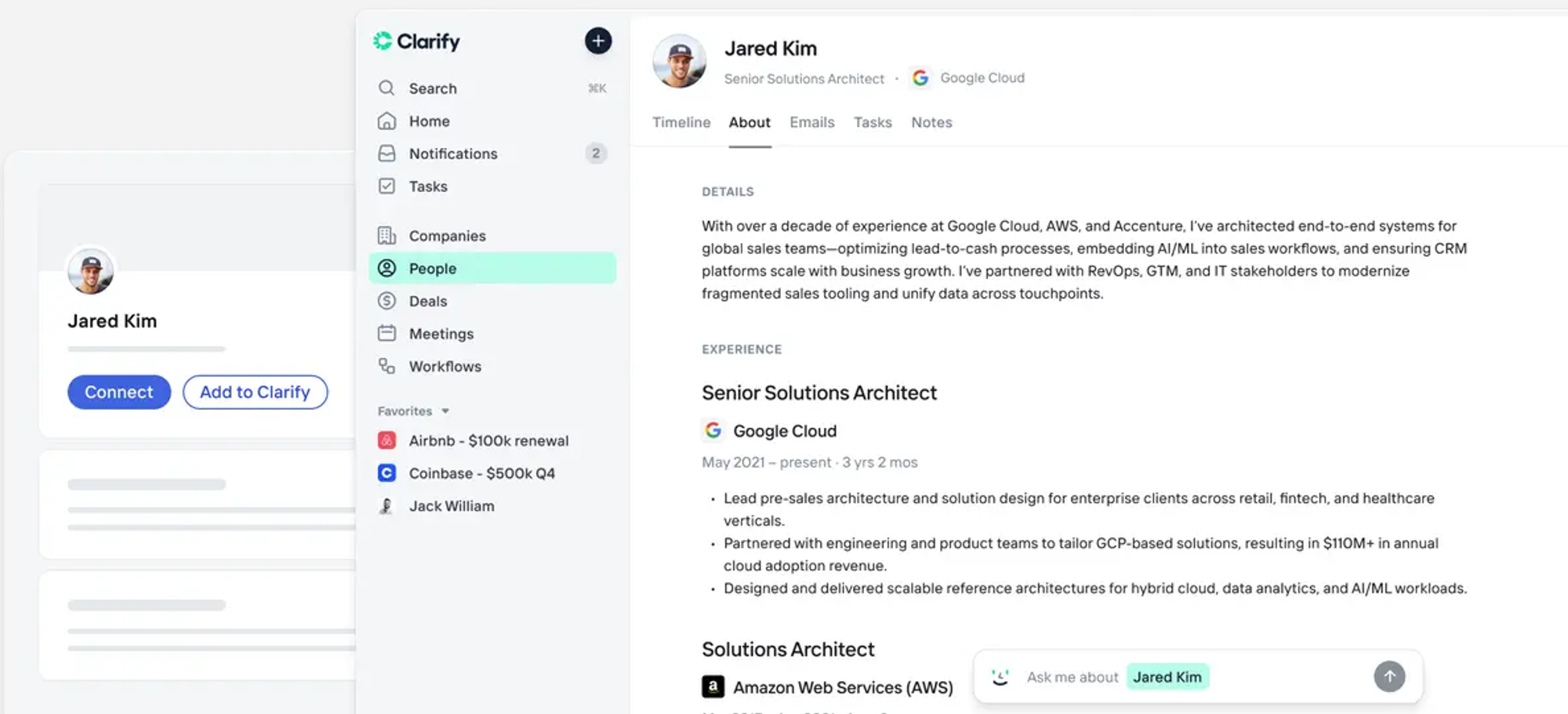
Final Score: 8.7/10
Most CRMs promise AI features. Clarify delivers autonomous execution.
Instead of asking your team to log every call, email, and meeting manually, Clarify connects to your existing workflow and captures everything automatically. It enriches contacts with company data, funding history, and job titles. It records meetings, generates summaries, and suggests pipeline updates. It even drafts follow-up emails based on conversation context.
What makes Clarify different
Event-driven architecture. Unlike traditional CRMs that wait for humans to update them, Clarify reacts to signals in real-time. An email from a prospect triggers automatic record updates. A scheduled call pulls in recent company news and conversation history for prep. A deal stalls, and the system suggests next steps.
Credit-based pricing that aligns with value. Clarify doesn't charge per seat. You pay for what the AI actually does—transcriptions, enrichments, automated tasks. This means you can give access to your entire team without multiplying costs. The free tier includes 2,500 credits monthly, enough to test the system with real workflows before committing.
Built for founders, not enterprises. The interface feels like Linear or Notion—clean, fast, modern. Setup takes minutes, not weeks. There's no expensive implementation partner required, no extensive training needed.
Clarify's pricing
- Free: 2,500 credits/month, core CRM, enrichment, meeting intelligence, email sending, integrations
- Starter: $20/month for 5,000 credits (add 5,000 more for $20), everything in Free plus advanced enrichment and chat support
- Growth: Custom credit packages, dedicated account manager, CRM migration included, enterprise security (SCIM/SAML)
Best for
Fast-growing startups and founder-led sales teams who want to spend time connecting with prospects instead of updating spreadsheets. Teams tired of choosing between expensive enterprise CRMs and basic tools that can't keep up with their growth.
Start with Clarify's free plan and see an autonomous CRM in action
HubSpot: The comprehensive free option
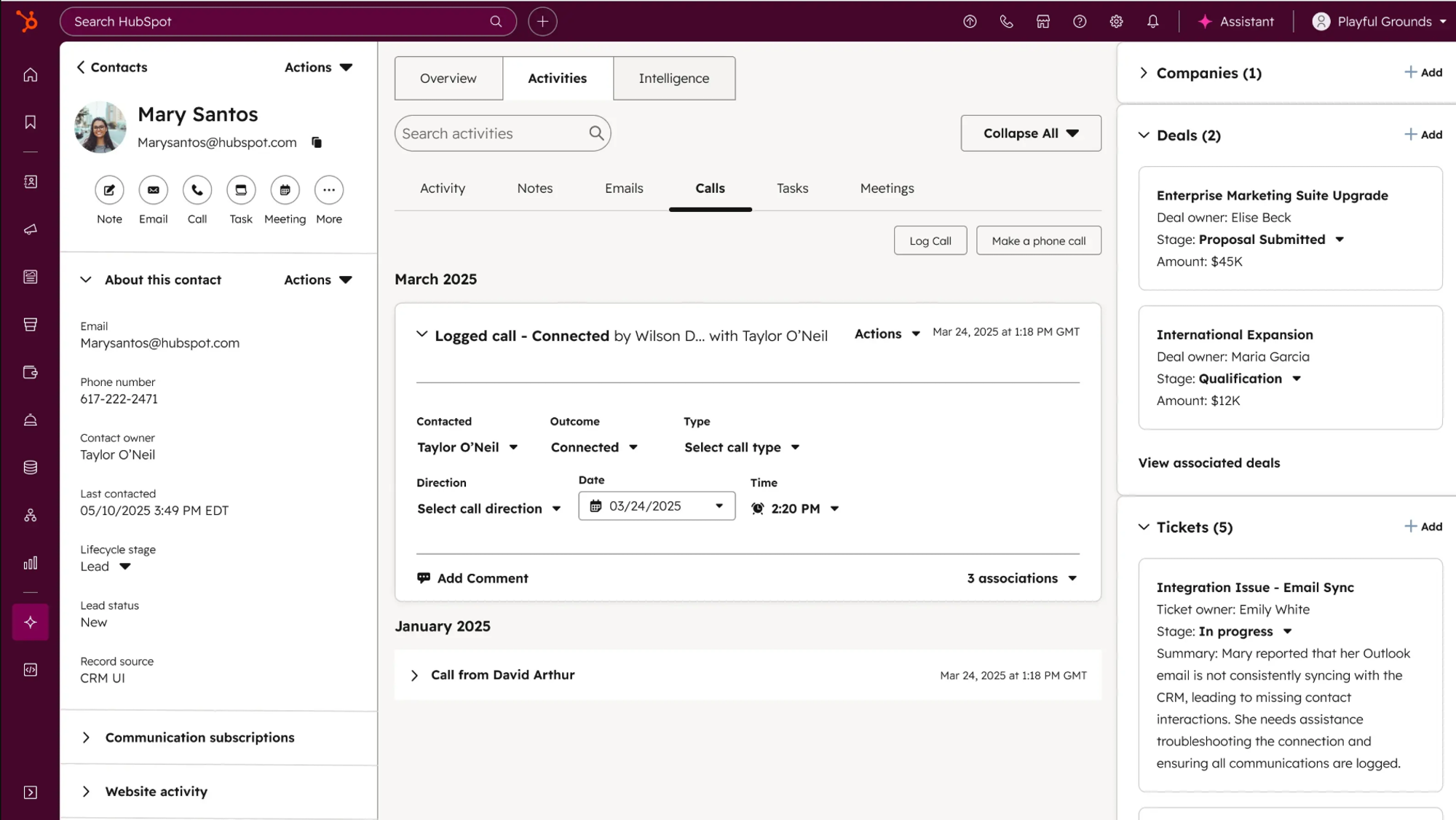
Final Score: 8.0/10
HubSpot's free CRM offers more functionality than most paid platforms. Contact management, deal tracking, email tracking, meeting scheduling, and basic automation—all available at no cost for unlimited users.
The catch? Growth gets expensive, fast.
HubSpot's strengths
The free tier is legitimately useful. Unlike "free trials" that expire after 14 days, HubSpot's free CRM remains functional indefinitely. You can manage unlimited contacts and track basic sales activities without paying a dollar.
All-in-one platform potential. As you scale, HubSpot offers Marketing Hub, Sales Hub, Service Hub, and Operations Hub. Everything lives in one ecosystem, reducing integration headaches.
Massive integration library. HubSpot connects with thousands of third-party apps, meaning your existing tools probably integrate natively.
HubSpot's pricing
- Free: Core CRM for unlimited users
- Sales Hub Starter: $20/user/month
- Sales Hub Professional: $100/user/month
- Sales Hub Enterprise: $150/user/month
Note: AI features (Breeze Copilot) require paid plans and additional fees on top of base pricing.
Best for
Teams that want a single platform to grow into, even if it means higher costs later, and businesses prioritizing marketing automation alongside sales tools.
Zoho CRM: The budget-conscious choice

Final Score: 8.4/10
Zoho CRM offers one of the most competitive pricing structures in the market, with robust features at price points that won't shock small business budgets.
Zoho's strengths
Unbeatable price-to-feature ratio. Starting at $14 per user monthly, Zoho includes workflow automation, lead scoring, and 250 mass emails daily—features that cost significantly more elsewhere.
Zia AI assistant. Zia provides predictive lead scoring and intelligent recommendations, helping prioritize which prospects deserve attention first.
Part of a broader ecosystem. Zoho offers complementary tools for project management, accounting, and HR—all designed to work together, potentially reducing your overall software spend.
Zoho's pricing
- Standard: $14/user/month (workflows, forecasting, email automation)
- Professional: $23/user/month (inventory, Google Ads integration, deeper analytics)
- Enterprise: $40/user/month (unlimited custom reports, advanced scoring)
- Ultimate: $52/user/month (custom ML, augmented analytics)
Plus: Free edition for up to 3 users with 5,000 records.
Best for
Bootstrapped businesses where every dollar matters. Teams that are comfortable with a less modern interface in exchange for significant cost savings.
Freshsales: The AI-powered all-rounder
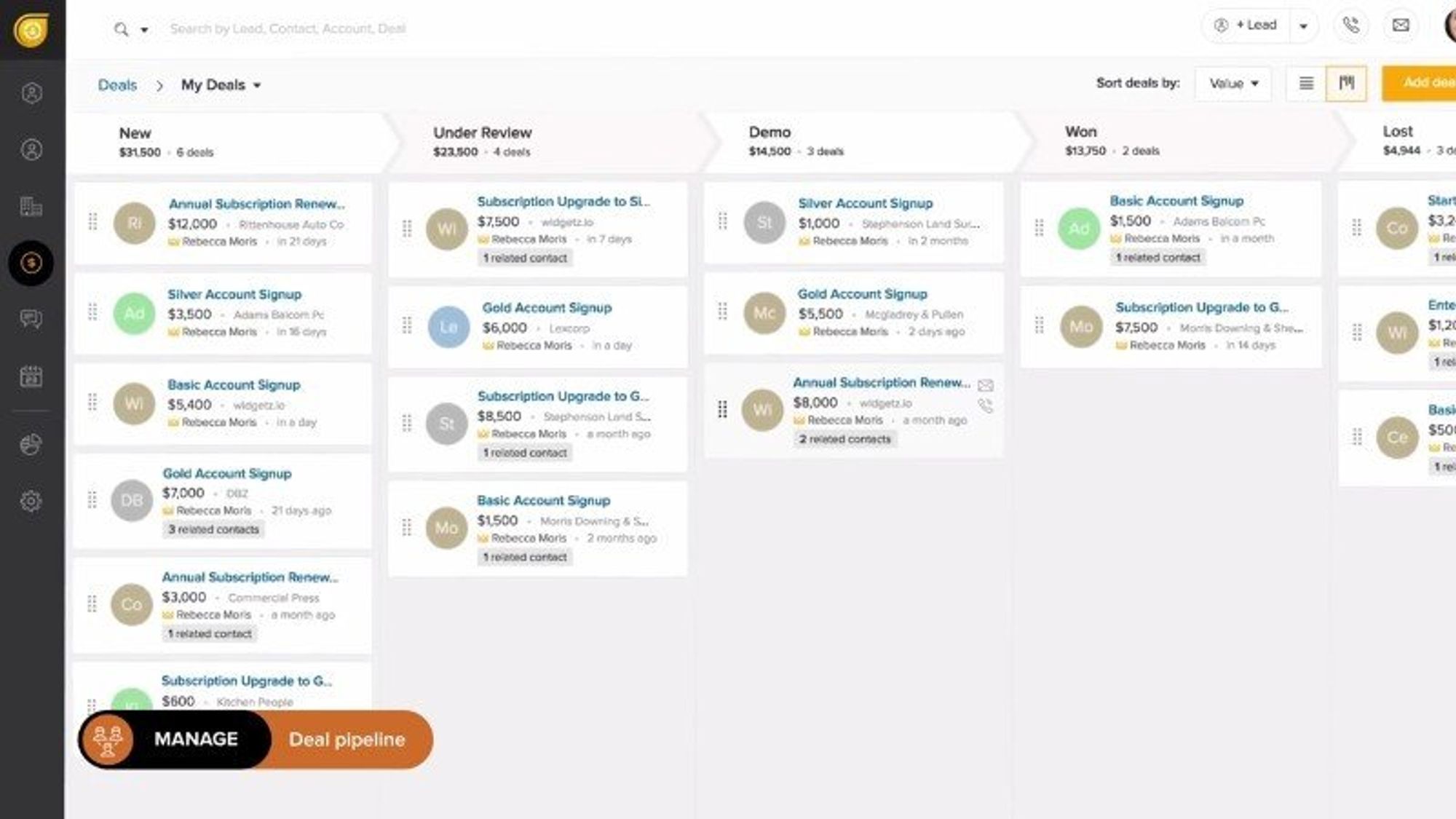
Final Score: 8.3/10
Freshsales combines a user-friendly interface with powerful Freddy AI automation, making it an excellent middle-ground option for small businesses.
Freshsales' strengths
Freddy AI that learns. The AI analyzes prospect behavior to score leads, suggest optimal email send times, and identify at-risk deals before they stall.
Exceptional support on free tier. Unlike most competitors, Freshsales offers 24/5 phone, chat, and email support even on the free plan.
Built-in phone and email. Make calls and send emails directly from the CRM without switching tools or paying for add-ons.
Freshsales' pricing
- Free: Basic CRM for up to 3 users
- Growth: $11/user/month (AI features, automations)
- Pro: $47/user/month (AI scoring, sales sequences)
- Enterprise: $71/user/month (forecasting, sandbox testing)
Best for
SaaS startups and tech companies that value clean design and robust API access for custom integrations.
Pipedrive: Visual pipeline management
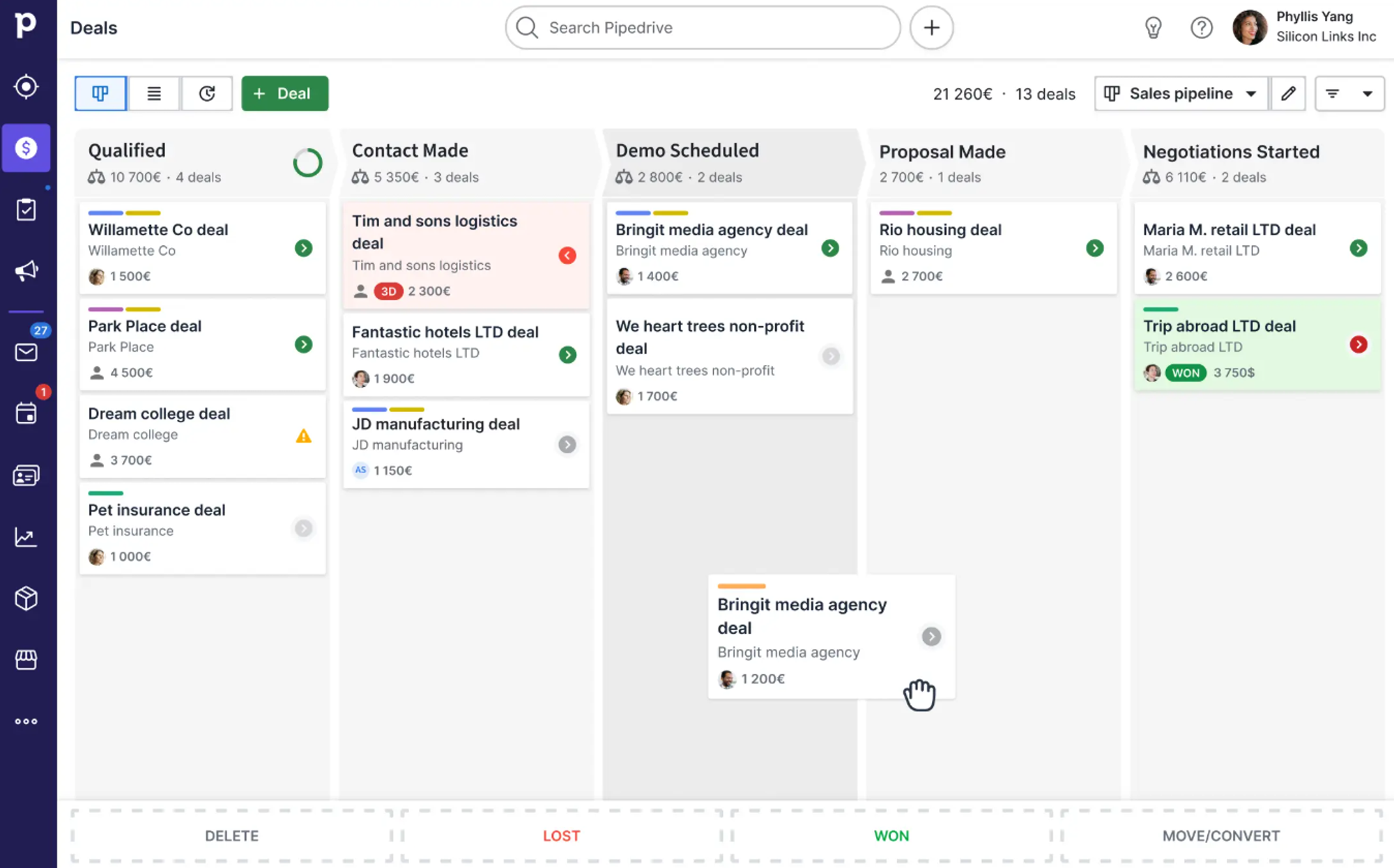
Final Score: 7.8/10
Pipedrive excels at visual deal tracking, with a drag-and-drop interface that makes pipeline management feel intuitive rather than administrative.
Pipedrive's strengths
Designed for sales velocity. The entire interface centers on moving deals forward. Every feature reinforces the question: "What do I need to do next to close this?"
AI-driven recommendations. The system suggests which deals to focus on, when to follow up, and which actions typically lead to closed deals.
Activity-based selling. Built-in reminders and activity tracking ensure no prospect gets forgotten in the shuffle.
Pipedrive's pricing
- Lite: $24/user/month (pipeline management, reports, 500+ integrations)
- Growth: $49/user/month (email sequences, automations, scheduler)
- Premium: $79/user/month (lead routing, enrichment, e-signatures)
- Ultimate: $99/user/month (enhanced security, phone enrichment)
Best for
Service providers, consultants, and B2B companies with straightforward sales processes that prioritize deal visibility over complex automation.
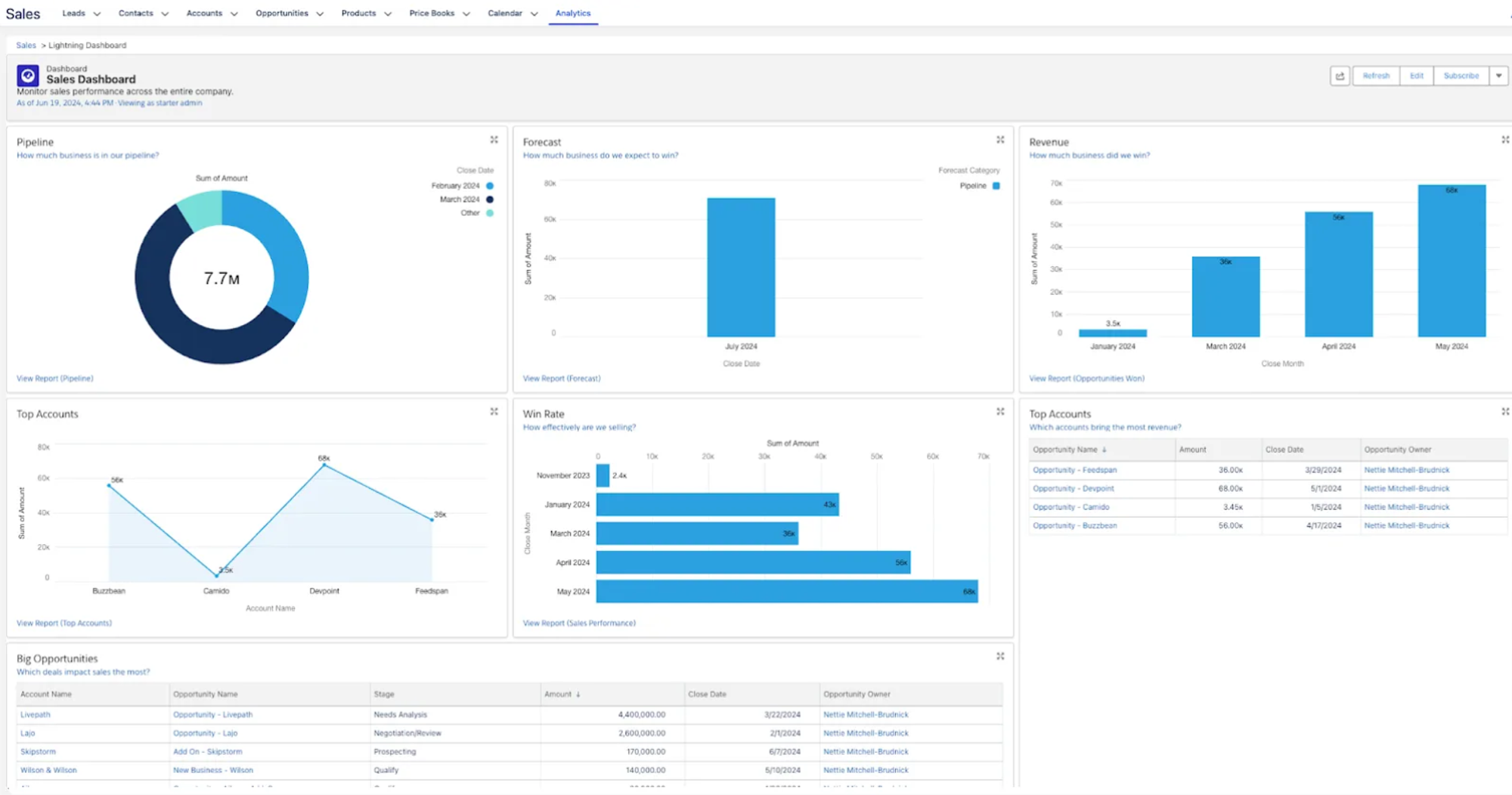
Salesforce Starter: Enterprise power for small businesses that want to scale
Final Score: 8.0/10
Salesforce is the 800-pound gorilla of CRM. The Starter Suite brings enterprise-grade capabilities to small business budgets—though "small business" might be generous.
Salesforce's strengths
Battle-tested at scale. If you're building something that could become a unicorn, starting on Salesforce means never hitting platform limitations as you grow.
Unmatched integrations. The AppExchange offers thousands of pre-built integrations and extensions for virtually any use case.
Advanced customization. Custom objects, complex workflows, territory management—everything is possible with enough configuration.
Salesforce's pricing
- Starter: $25/user/month (core CRM, 10,000 contacts)
- Pro: $100/user/month (advanced automation, forecasting)
- Enterprise: $175/user/month (full customization, API access)
Best for
Small businesses with enterprise ambitions and technical resources to handle implementation complexity. Teams that prioritize long-term scalability over short-term simplicity.
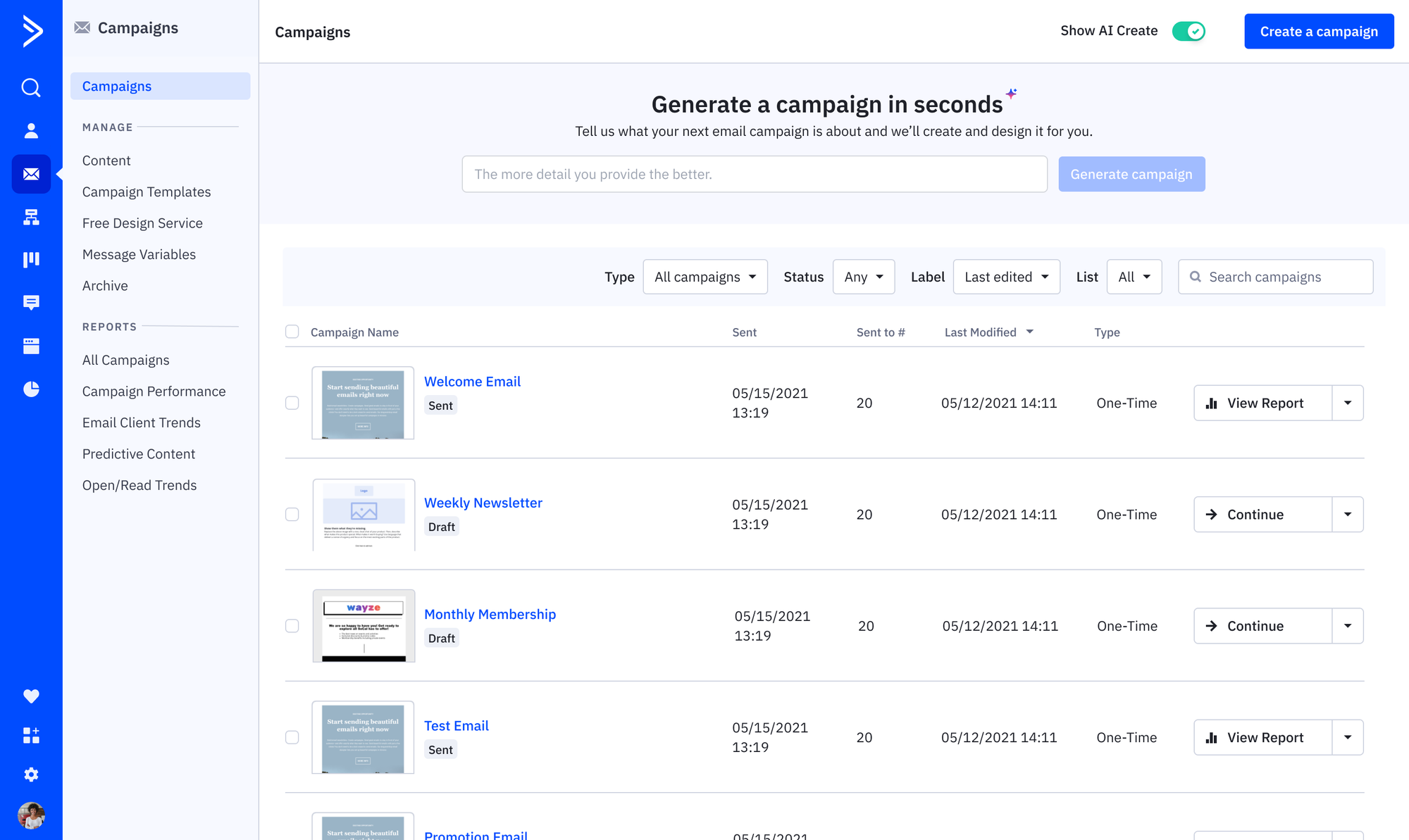
ActiveCampaign: Marketing automation meets CRM
Final Score: 8.0/10
ActiveCampaign bridges CRM and marketing automation, making it ideal for businesses where email nurturing drives revenue.
ActiveCampaign's strengths
Visual automation builder. Create sophisticated email sequences with conditional logic, behavioral triggers, and multi-step campaigns—all through a drag-and-drop interface.
Predictive sending. AI analyzes individual behavior to determine optimal send times for each contact, improving open rates without manual testing.
Advanced segmentation. Target messaging based on behavior, engagement, demographics, or custom properties—turning generic blasts into personalized conversations.
ActiveCampaign's pricing
Pricing scales with contact count:
- Starter: $15/month (1,000 contacts), $391/month (25,000 contacts)
- Plus: $49/month (1,000 contacts), $609/month (50,000 contacts)
- Pro: $79/month (1,000 contacts), $969/month (50,000 contacts)
Note: Pricing assumes a single user; additional users cost extra.
Best for
B2B companies, coaches, and e-commerce businesses where complex email nurturing sequences drive sales. Less suitable if you need robust sales pipeline management.
Mistakes to avoid when choosing a CRM for small business
Small businesses don’t have the same need as enterprise sales teams. When you’re choosing your CRM, remember these common pitfalls.
Mistake #1: Choosing a CRM based on features you don’t really need
Sales teams are masters at using battle cards and feature comparison spreadsheets to make their solution sound like your best option. But in a spreadsheet with 47 comparison points, you might only need 10 features. The rest are just noise—even if they sound attractive.
Choose a CRM based on what you need right now. Look to the future, sure, so you can pick a platform that will scale with you. But don’t get caught up in future features that you think might make an impact someday.
Mistake #2: Ignoring the adoption problem
The vast majority of companies don’t get full value out of the software they deploy. CRMs are no different.
The best CRM is one your team actually uses. Prioritize platforms that are easy to use, offer mobile functionality, and slowly ramp your team up to more complex features without requiring extensive training.
Mistake #3: Only thinking about price
Even a free CRM can come with hidden costs. Migrating from a different platform? Then you need to account for lost productivity, actual migration costs, and opportunity costs that come with your migration.
Additionally, cheaper CRMs may not have all the options and features you’d find in a more expensive option. That’s why price is just one factor of many to consider with a CRM. Don’t just go for the cheapest option. Actually compare what you’re getting with what you’re paying.
Mistake #4: Neglecting integration requirements
Your CRM needs to work with email, calendar, video calling, accounting software, and whatever other tools your business runs on.
Before committing, verify that critical integrations exist and work reliably. Missing integrations mean manual data transfer—exactly what you're trying to avoid.
Pick the autonomous option: Try Clarify
The right CRM for you depends on one question: how do you actually sell?
If you're founder-led and need to maximize time spent with prospects rather than in administrative tasks, autonomous platforms deliver immediate value through AI that works for you, not just advises you. If you want to offload as many non-selling tasks as possible so your sellers can do what they do best, you want an AI-native platform that will support them in that pursuit. You need Clarify.
Want to see what Clarify can do for your team? Start using it for free.
FAQ: The best CRM for small business
How long does CRM implementation actually take?
Most founder-friendly CRMs can be configured and start capturing leads within 24-48 hours. Enterprise platforms like Salesforce may take weeks. If you're still configuring basic workflows after the first week, either the platform is wrong or you're over-engineering the setup.
What if my team refuses to use the CRM?
The average CRM user adoption among sales professionals is 72%, but that includes teams forced to use clunky systems. Adoption improves dramatically when the CRM saves time rather than creates work. Choose platforms with autonomous data capture so your team benefits immediately rather than feeling like they're maintaining a database for management.
Should I start with a free plan or commit to paid?
Start free if available. Most quality CRMs offer functional free tiers that let you validate fit before spending. But don't let free tier limitations cripple your workflow—upgrade once you've confirmed the platform works for your team, typically after 30-60 days of real usage.
How do I know if I've outgrown my CRM?
Warning signs: constant manual workarounds, hitting user or contact limits, your team using external tools because the CRM can't handle a workflow, or spending hours weekly cleaning data. These signal it's time to upgrade features or migrate platforms. Don't limp along with inadequate tools—poor CRM infrastructure directly limits revenue growth.
What's the biggest CRM mistake small businesses make?
Fifty percent of CRM projects fail due to a lack of cross-functional coordination. The technical choice matters less than getting buy-in from everyone who'll use the system. Include sales, marketing, and customer success in the selection process. Test the actual workflows your team uses daily. A perfect CRM on paper becomes useless if your team won't adopt it.
Get our newsletter
Subscribe for weekly essays on GTM, RevTech, and Clarify’s latest updates.
Thanks for subscribing! We'll send only our best stuff. Your information will not be shared and you can unsubscribe at any time.